
Parkour Online
Play Parkour Online Free
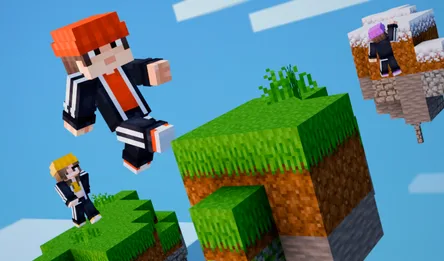
Parkour Online is a free 3D parkour game built around movement, exploration, and the satisfying risk of taking one more jump across a gap. Instead of following a short, fixed track, you enter a large block-style map where platforms, walls, ledges, and open space create several possible routes. Run across the environment, jump between surfaces, grab reachable edges, and learn how the map is shaped while other players move through the same world.
The game is easy to start because the objective is visible: keep moving and reach the next safe platform. The challenge grows from the way speed, distance, height, and camera position interact. A route that looks faster may leave you with no ledge to catch, while a slower line around a wall can create a much safer landing. That makes Parkour Online a useful choice for players searching for a free online parkour game, a 3D obstacle course, or a browser movement game with room to explore.
What Makes Parkour Online Different
The map is the main puzzle. Large platforms give you space to build confidence, but narrow edges and separated blocks ask for more deliberate movement. You are not only reacting to an obstacle in front of you; you are choosing where to stand, which edge to aim for, and whether the next jump should be taken at running speed or from a controlled position.
Because other players can appear in the same environment, the world feels active even when you are practicing a familiar route. You can watch another runner reveal a shortcut, follow a group toward an unusual platform, or pause to inspect a place that seems to hide a second path. The open layout gives successful movement a sense of discovery that a straight-line runner does not always provide.
Main Features
- Large 3D map: Explore a block-built environment with platforms, walls, gaps, and elevated routes.
- Parkour movement: Combine running, jumping, climbing, and ledge grabbing to stay on the course.
- Online player presence: See other players exploring the same map and use the shared world to find ideas.
- Alternative routes: Test safer lines, shortcuts, and less obvious paths instead of repeating one track.
- Browser access: Start the free parkour experience from the game page without a separate download.
How to Play Parkour Online
On PC, use W, A, S, and D to move. Hold Shift to run when you need additional speed. Aim your character toward the next platform, adjust the camera so the landing surface remains visible, and jump only after you have a clear line. When the game presents a ledge-grab action, aim at the edge and hold the left mouse button as indicated by the game.
Start by crossing broad platforms and identifying where the next safe landing sits. When you reach a high ledge, look around before committing to a jump; the obvious lower route may connect to a better climb. If a jump fails, return to the same area with a different starting angle or speed. Mobile input can differ by device, so follow the controls shown inside the game on touch screens.
Parkour Online Strategy Tips
- Build speed before a long gap: Use a straight, open section to prepare instead of trying to accelerate at the edge.
- Keep the landing visible: Adjust the camera before jumping so the target platform does not disappear below the screen.
- Use ledges as recovery points: A successful grab can turn a missed landing into a route forward, but aim for reachable edges rather than distant walls.
- Study other players: Their movement can reveal a shortcut, a hidden platform, or a safer order for a group of jumps.
- Explore after reaching a safe height: Check side platforms and corners before dropping back to the main route.
Exploration, Chat, and Customization
Parkour Online is more than a short obstacle run. The large map supports casual exploration, and the presence of other players makes it natural to compare routes or ask for help through chat when a section is unclear. Hidden areas and alternate paths give experienced players a reason to return after they can already complete the obvious route. Available character skins also add a small customization goal while you practice movement.
The best sessions can have different goals. You might focus on reaching a distant landmark, finding a secret route, following another player, or improving a jump that previously caused a fall. This flexible structure suits both quick browser sessions and longer attempts to understand the whole map.
Browser Play on PC and Mobile
Play Parkour Online in a current browser and click inside the game frame before using keyboard controls. A larger screen helps you judge distance and keep track of ledges, while a stable connection helps the shared map and player characters load correctly. Give each jump a moment of visual preparation, especially after entering a new area. If the touch layout or button labels differ on mobile, use the controls displayed in the game.
Frequently Asked Questions
What is Parkour Online? It is a free 3D online parkour game where you run, jump, climb, and explore a large block-style map.
What are the PC controls? Use W/A/S/D to move and Shift to run. The game shows the action used for ledge grabbing when it is available.
Can I play with other people? Yes. Other players can appear in the shared map, and chat can help players compare routes or ask for guidance.
Are there alternate routes? The open map includes different platform lines and less obvious areas, so exploring around an obstacle can reveal another way forward.
Can I change the character look? The game includes multiple skins that can be used to customize the character appearance.